

Tracking your rides is more useful when you can actually see them. This update is about that.
Your tracks on real terrain
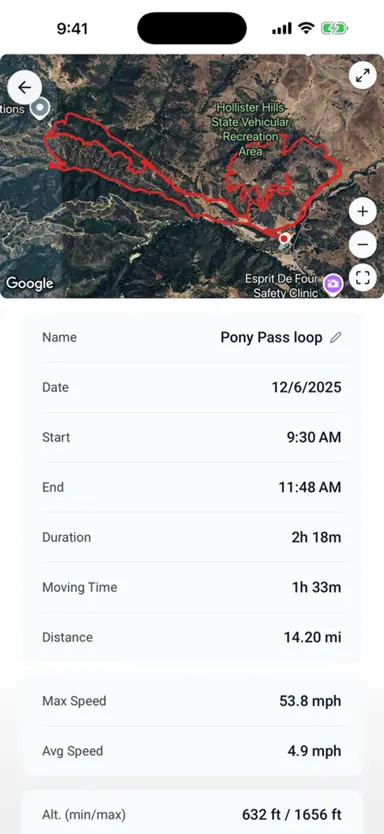
Every ride now gets a satellite map preview with start and end markers. Open a ride and you see where you actually went, on real imagery, not a flat line on a blank grid. There’s a detail page for each track with the stats and the map together, and you can rename a track, copy it to another machine, or delete the ones you don’t need.
Bring rides in from anywhere
If you record rides in another app, you don’t have to choose between that app and LookOver. GPX import is here. Recorded a ride in onX, Gaia, Strava, or whatever you use? Import the file and it shows up right alongside your LookOver tracks, feeding the same hours and miles into your machine’s history.
Quieter under the hood
A few things got more solid too. Ride recovery now catches orphaned tracks if the app closes mid-ride, so a crash doesn’t cost you the ride. GPS jitter filtering got smarter, so your routes come out clean instead of looking like you rode through a blender. And your ride titles get a sensible time-of-day label automatically.
The more your rides show up the way they actually happened, the more the whole thing earns its place on your phone.
Ride more. Wrench less.